Vuetify Form Validation
Full Stack MEVN App
Recently, I have been learning Express and this app I have been working on will eventually be a Survey App, a more full-featured version of the Rails/Vanilla JS app I did as part of Flatiron. This app utilizes MongoDB, Express, and a Vue.js frontend. I recently finished backend user account authentication with JWT and added registration and login forms, routing, and logic to the frontend.
TL;DR: Check out the Repository for the Code, or the live site at Heroku.
Data Flow
So, in a full-stack application of this architecture type, the data flow for user accounts works like this. A request is sent to the backend to either register for an account or request login credentials in the form of a token, which is routed through Vuex. As data is sent to the backend, the server will validate it and send back a response.
I decided to set up form validation on the frontend because it will give the user immediate feedback. I can still validate the data sent to the server. Still, this article is about form validation using Vuetify, a Material Design component library for Vue.js, and Vuelidate, a validation library Vuelidate.
Vuelidate
I am only going to cover the Registration Form here because the Login form is a stripped-down version of it. We will cover each section of this form:
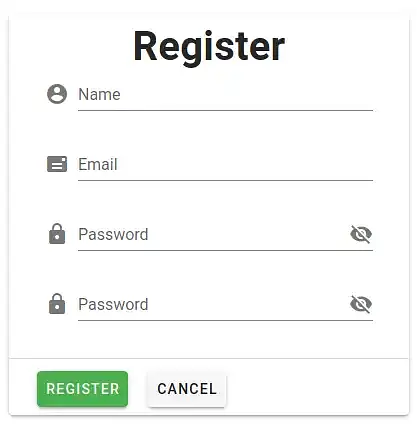
Name Field
First, we will need to install the vuelidate package with yarn add vuelidate or npm install --save vuelidate.
Let's start with the Name field. In addition to the standard Vuetify form field code, we add :error-messages, required, and the @input and @blur events. This will be a pattern for each field:
<v-text-field
    v-model="email"
    :error-messages="emailErrors"
    label="Email"
    required
    @input="$v.email.$touch()"
    @blur="$v.email.$touch()"
    prepend-icon="mdi-mail"
/>
In the script In this section, we need to do a little setup. We import the required packages. Notice in the validations section that we are setting up the name to validate as required and with a minimum length of 4 characters. Also, we have set up the required data elements to v-bind to:
<script>
import { validationMixin } from "vuelidate";
import { required, minLength, email, sameAs } from "vuelidate/lib/validators";

export default {
  mixins: [validationMixin],
  validations: {
    name: { required, minLength: minLength(4) },
    email: { required, email },
    password: { required, minLength: minLength(6) },
    confirmPassword: { sameAsPassword: sameAs("password") }
  },
  data() {
    return {
      name: "",
      email: "",
      password: "",
      confirmPassword: "",
      status: null,
      showPassword: false
    };
  },
In the script section, we add our error messages:
computed: {
    nameErrors() {
      const errors = [];
      if (!this.$v.name.$dirty) return errors;
      !this.$v.name.minLength &&
        errors.push("Name must be at least 4 characters long.");
      !this.$v.name.required && errors.push("Name is required.");
      return errors;
    },
    ...
This is the same pattern for each element.
- Add the vuelidate binding to the form element
- Make sure we have a data element for the field
- Set error messages in computed values
Email field
Here are the form elements for the email field:
<v-text-field
    v-model="email"
    :error-messages="emailErrors"
    label="Email"
    required
    @input="$v.email.$touch()"
    @blur="$v.email.$touch()"
    prepend-icon="mdi-mail"
/>
Since we have already added the data bindings, we add the error message, where we check for a valid email and its presence:
computed: {
    nameErrors() {
      const errors = [];
      if (!this.$v.name.$dirty) return errors;
      !this.$v.name.minLength &&
        errors.push("Name must be at least 4 characters long.");
      !this.$v.name.required && errors.push("Name is required.");
      return errors;
    },
    emailErrors() {
      const errors = [];
      if (!this.$v.email.$dirty) return errors;
      !this.$v.email.email && errors.push("Must be valid e-mail");
      !this.$v.email.required && errors.push("E-mail is required");
      return errors;
    },
Password field
Here are the form elements for the password field:
<v-text-field
    v-model="password"
    :type="showPassword ? 'text' : 'password'"
    :error-messages="passwordErrors"
    label="Password"
    required
    @input="$v.password.$touch()"
    @blur="$v.password.$touch()"
    prepend-icon="mdi-lock"
    :append-icon="showPassword ? 'mdi-eye' : 'mdi-eye-off'"
    @click:append="showPassword = !showPassword"
/>
Since we have already added the data bindings, we add the error message, where we check for a password of the specified characters, and its presence:
computed: {
    nameErrors() {
      const errors = [];
      if (!this.$v.name.$dirty) return errors;
      !this.$v.name.minLength &&
        errors.push("Name must be at least 4 characters long.");
      !this.$v.name.required && errors.push("Name is required.");
      return errors;
    },
    emailErrors() {
      const errors = [];
      if (!this.$v.email.$dirty) return errors;
      !this.$v.email.email && errors.push("Must be valid e-mail");
      !this.$v.email.required && errors.push("E-mail is required");
      return errors;
    },
    passwordErrors() {
      const errors = [];
      if (!this.$v.password.$dirty) return errors;
      !this.$v.password.minLength &&
        errors.push("Password must be at least 6 characters long");
      !this.$v.password.required && errors.push("Password is required");
      return errors;
    },
Confirm Password field
Here are the form elements for the confirm password field:
<v-text-field
    v-model="confirmPassword"
    :type="showPassword ? 'text' : 'password'"
    :error-messages="confirmPasswordErrors"
    label="Password"
    required
    @input="$v.confirmPassword.$touch()"
    @blur="$v.confirmPassword.$touch()"
    prepend-icon="mdi-lock"
    :append-icon="showPassword ? 'mdi-eye' : 'mdi-eye-off'"
    @click:append="showPassword = !showPassword"
/>
Since we have already added the data bindings, we add the error message. The confirm password field is a little different. We use the sameAs method to verify that it is the same as the password field. Since it is checking if the password is the same, we do not need to check for the required presence error message, but we are checking for the length:
computed: {
    nameErrors() {
      const errors = [];
      if (!this.$v.name.$dirty) return errors;
      !this.$v.name.minLength &&
        errors.push("Name must be at least 4 characters long.");
      !this.$v.name.required && errors.push("Name is required.");
      return errors;
    },
    emailErrors() {
      const errors = [];
      if (!this.$v.email.$dirty) return errors;
      !this.$v.email.email && errors.push("Must be valid e-mail");
      !this.$v.email.required && errors.push("E-mail is required");
      return errors;
    },
    passwordErrors() {
      const errors = [];
      if (!this.$v.password.$dirty) return errors;
      !this.$v.password.minLength &&
        errors.push("Password must be at least 6 characters long");
      !this.$v.password.required && errors.push("Password is required");
      return errors;
    },
    confirmPasswordErrors() {
      const errors = [];
      if (!this.$v.confirmPassword.$dirty) return errors;
      !this.$v.confirmPassword.sameAsPassword &&
        errors.push("Password must be at least 8 characters long");
      return errors;
    }
Sending the Form
So, I send the form to the back end via Vuex with the following actions on the Register button. Notice we are including $v.$touch which binds and listens to the fields noted above. I am only sending name, email, and password to the backend, since we are validating the confirmation password on the form.
methods: {
    async register() {
      this.$v.$touch();
      this.$store
        .dispatch("register", {
          name: this.name,
          email: this.email,
          password: this.password
        })
        .then(() => {
          this.$router.push({ name: "Dashboard" });
        })
        .catch(err => {
          console.log(err);
        });
    },
    cancel() {
      return this.$router.push({ name: "Home" });
    }
  }