Rails Testing Setup
How do you set up a Rails project for testing? In this article, we will explore what a testing suite, using RSpec and other tools, is for a robust developer's experience. This article touches on my approaches to testing tools as I have been focused on learning RSpec.
TLTR: Hey, grab the code
Basic project setup.
First, we need to start a Rails project. We will use the -T switch to exclude testing since we will opt for RSpec over the Rails default of minitest. We will also default to Postgres for our database. This is not required, just my preference:
rails new rails_testing_setup -T --database=postgresql
Create and migrate the databases.
rails db:prepare && rails db:migrate
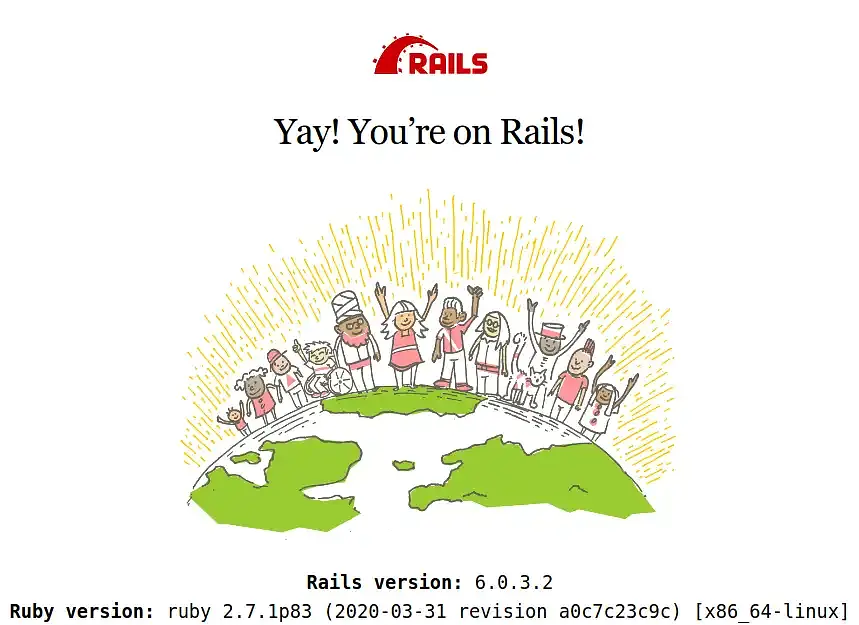
You can start rails server and see the familiar Rails splash screen.
Basic Testing
To set up testing, we are going to use RSpec, which, according to the RSpec website, is "Behaviour Driven Development for Ruby. Making TDD Productive and Fun." I am not sure about all of that, but it is what we are setting up.
Basic Rspec setup
We will add two gems to your Gemfile in the development and test group, RSpec and Capybara, which help you test web applications by simulating how a real user would interact with your app:
group :development, :test do
  ...
  gem "capybara", ">= 2.15"
  gem "rspec-rails"
  ...
end
If by chance, you forgot to exclude the testing framework from the Rails setup, make sure you delete the test directory. It doesn't hurt anything, but it's best practice not to include two testing directories. Then set up RSpec: rails g rspec:install. This will install a spec directory with a couple of helper files.
Now, we need to clean up and add some configuration to the rails_helper.rb file. I start by cleaning out all the comments, but that is just me. Then update the RSpec.configuration block:
RSpec.configure do |config|
  config.use_transactional_fixtures = true
  config.infer_spec_type_from_file_location!
  config.filter_rails_from_backtrace!
end
Also add a require at the top of the file below rails for Capybara:
require "rspec/rails"
require "capybara/rails"
If you run rspec everything should be green and ok, since we have no test.
Database Cleaner I also want to make sure the test database is a clean slate, so we need to add the gem database_cleaner to the development and test group, which should now look like:
group :development, :test do
  gem 'byebug', platforms: %i[mri mingw x64_mingw]
  gem "capybara", ">= 2.15"
  gem 'database_cleaner'
  gem 'rspec-rails'
end
Run bundle install and then configure our rails_helper.rb again:
RSpec.configure do |config|
  config.use_transactional_fixtures = true
  config.before(:suite) { DatabaseCleaner.clean_with(:truncation) }
  config.before(:each) { DatabaseCleaner.strategy = :transaction }
  config.before(:each, js: true) { DatabaseCleaner.strategy = :truncation }
  config.before(:each) { DatabaseCleaner.start }
  config.before(:each) { DatabaseCleaner.clean }
  config.infer_spec_type_from_file_location!
  config.filter_rails_from_backtrace!
end
If you run rspec everything should be green and ok, since we have no test.
Factories
So, factories are a fixtures replacement with a straightforward definition syntax, support for multiple build strategies (saved instances, unsaved instances, attribute hashes, and stubbed objects), and support for multiple factories for the same class (user, admin_user, and so on), including factory inheritance.
We will install a Rails version of FactoryBot, a replacement for FactoryGirl. So, we need to add the gem factory_bot_rails to the development and test group, which should now look like this:
group :development, :test do
  gem 'byebug', platforms: %i[mri mingw x64_mingw]
  gem 'database_cleaner'
  gem "factory_bot_rails", git: "http://github.com/thoughtbot/factory_bot_rails"
  gem 'rspec-rails'
end
Run bundle install. If you run rspec everything should be green and ok, since we have no test.
Add a test
Let's add a test. In true Test-Driven development, we are going to create a test to verify that a root path renders a home page. We are going to create a feature test. RSpec provides a whole series of generators, and we will use the feature generator, which will create the features directory and the associated test we name.
rails g rspec:feature static
We will create the following feature test, which will simulate a user visiting a static page at /. Thankfully, this is available because of capybara. Edit static_spec.rb:
require 'rails_helper'

RSpec.feature 'Statics', type: :feature do
  scenario do
    visit "/"

    expect(page.status_code).to eq(200)
  end
end
This test will fail because we need a controller for a home page. Let's create a static controller that we can use for other static pages in the project. By stipulating home it will generate a controller method and a view of home.
rails g controller static home
Unfortunately, the test will still fail because we do not have a root route specified in config/routes.rb. Add the following:
root 'static#home'
Now our tests are GREEN and passed.
Automated Testing
So far, we have a perfectly acceptable test environment. However, I would much rather automate the testing so we do not have to run the rspec command.
Guard: We will use a gem called guard-rspec, which automatically runs your spec files. Let's add a few gem files to the development group:
group :development do
  gem 'guard'
  gem 'guard-rspec'
  gem 'listen', '~> 3.2'
  gem 'spring'
  gem 'spring-watcher-listen', '~> 2.0.0'
  gem 'web-console', '>= 3.3.0'
end
We need to initialize Guard, which will create a configuration file: bundle exec guard init. I need to make one change to the newly created Guardfile. I have libnotify configured on my Linux system, and every time Guard runs the test suite, I get pop-up system notifications. You might like these for other system tasks (e.g., updates, email notifications), but they make me crazy to see these pop-up notifications every time I edit a spec file. So I added the following to the end of the Guardfile to stop these notifications for Guard: notification: off.
Progress reporter
One other feature I like. While learning minitest I loved having a more pronounced progress bar that was provided by minitest_reporter. We can enjoy this same feature with a gem called fuubar.
Let's add the gem to the development group:
group :development do
  bem 'fuubar'
  gem 'guard'
  gem 'guard-rspec'
  gem 'listen', '~> 3.2'
  gem 'spring'
  gem 'spring-watcher-listen', '~> 2.0.0'
  gem 'web-console', '>= 3.3.0'
end
We need to add require 'fuubar' to the top of the rails_helper.rb file, and add to the configuration block:
RSpec.configure do |config|
  config.use_transactional_fixtures = true
  config.before(:suite) { DatabaseCleaner.clean_with(:truncation) }
  config.before(:each) { DatabaseCleaner.strategy = :transaction }
  config.before(:each, js: true) { DatabaseCleaner.strategy = :truncation }
  config.before(:each) { DatabaseCleaner.start }
  config.before(:each) { DatabaseCleaner.clean }
  config.infer_spec_type_from_file_location!
  config.filter_rails_from_backtrace!
  config.fuubar_progress_bar_options = { format: 'Completed Tests <%B> %p%% %a' }
end
The progress bar options can be configured to your liking.
Edit the .rspec file:
--require spec_helper
--format Fuubar
--color
So how does it work?
- Start guard:
bundle exec guard - If you edit a spec file, Guard will automatically run the file with RSpec.
- If you want the entire test suite run, hit enter at the command prompt.
- Fuubar will displace a nice progress bar.

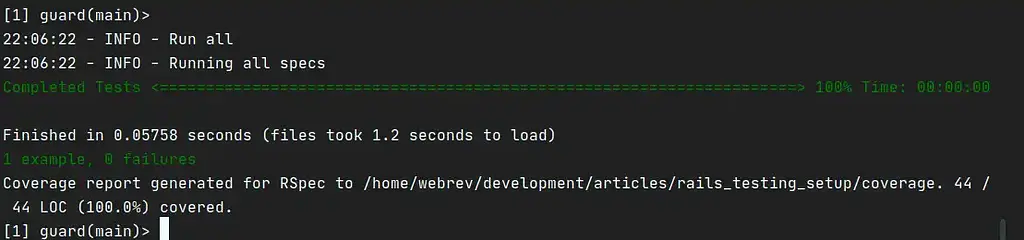
Notice that we have one test pass, and the progress bar is noted as Completed Test, which we defined in the fuubar configuration.
Code Coverage
Next, I want to add code coverage with a gem called simplecov. According to thesimplecov README:
SimpleCov is a code coverage analysis tool for Ruby. It uses Ruby's built-in Coverage library to gather code coverage data, but makes processing its results much easier by providing a clean API to filter, group, merge, format, and display those results, giving you a complete code coverage suite that can be set up with just a couple lines of code. SimpleCov/Coverage track covered ruby code, gathering coverage for common templating solutions like erb, slim and haml is not supported.
The setup is super easy. In our Gemfile, in the test group, we add a new gem:
group :test do
  gem 'selenium-webdriver'
  gem 'simplecov', require: false
  gem 'webdrivers'
end
Now add the following to the VERY top of the spec_helper.rb file:
require 'simplecov'
SimpleCov.start
We need to add a filter so that Simplecov skips rails_helper.rb. Create: .simplecov and add the following:
require 'simplecov'

SimpleCov.start do
  add_filter 'spec/rails_helper.rb'
end
Notice we have the path to a coverage report stored in a new coverage directory in the root of our project path. This way, we can analyse our code coverage. You can open it in your web browser.
Code style
Lastly, I want to install rubocop a tool to manage our code presentation quality. We will install three gems and add them to our development group:
group :development do
  ...
  gem "rubocop"
  gem "rubocop-rails", require: false
  gem "rubocop-rspec"
  ...
end
Using extensions in your IDE/editor, we can get recommendations for consistent code quality via Rubocop. We can create a configuration file for style overrides as you see fit. Below is my short .rubocop.yml configuration:
require:
  - rubocop-rails
  - rubocop-rspec

AllCops:
  Exclude:
    - bin/**/*
    - config/**/*
    - db/schema.rb
    - db/migrate/*.rb
    - node_modules/**/*
    - tmp/**/*
    - vendor/**/*

#################### Bundler ###########################

Bundler/OrderedGems:
  Description: >-
    Gems within groups in the Gemfile should be alphabetically sorted.
  Enabled: true
  ConsiderPunctuation: true

#################### Layout ###########################

Layout/LineLength:
  Description: 'Checks that line length does not exceed the configured limit.'
  AutoCorrect: true # this is false by default
  Exclude:
    - Gemfile

#################### Style ###############################

Style/StringLiterals:
  Description: 'Checks if uses of quotes match the configured preference.'
  StyleGuide: '#consistent-string-literals'
  Enabled: true
  EnforcedStyle: double_quotes
  ConsistentQuotesInMultiline: true

#################### RSpec cops from rubocop-rspec #######
# https://github.com/rubocop-hq/rubocop-rspec/blob/master/config/default.yml

RSpec/DescribeClass:
  Description: Check that the first argument to the top level describe is a constant.
  Enabled: true
  StyleGuide: https://www.rubydoc.info/gems/rubocop-rspec/RuboCop/Cop/RSpec/DescribeClass
  Exclude:
    - 'spec/requests/**/*'
    - 'spec/system/**/*'
    - 'spec/tasks/**/*'

RSpec/ExampleLength:
  Description: Checks for long examples.
  Enabled: true
  Max: 15
  StyleGuide: https://www.rubydoc.info/gems/rubocop-rspec/RuboCop/Cop/RSpec/ExampleLength

RSpec/MultipleExpectations:
  Description: Checks if examples contain too many `expect` calls.
  Enabled: true
  Max: 8
  StyleGuide: https://www.rubydoc.info/gems/rubocop-rspec/RuboCop/Cop/RSpec/MultipleExpectations
This is the testing framework setup I have started using on all my side projects. I hope this helps someone in some way.
Footnote
This has been fun. Leave a comment or send me a DM on Twitter.
Shameless Plug: If you work at a great company and you are in the market for a Software Developer with a varied skill set and life experiences, send me a message on Twitter and check out my LinkedIn.